
The Action Board View in BowTie Pro provides a visual workflow-based layout for managing actions and tracking progress.
Unlike the Action List view, the Board view groups actions into workflow stages, making it easier to:
- Monitor action progress
- Identify overdue items
- Review operational workloads
- Track deficiencies
- Visualise workflow status
The Board view is particularly useful during operational reviews, team meetings and action management activities.
Accessing the Action Board View
To open the Action Board View:
- Log in to BowTie Pro.
- Navigate to the top navigation menu.
- Select Actions.
- Open the Board view option.
The system will display actions grouped into workflow columns.
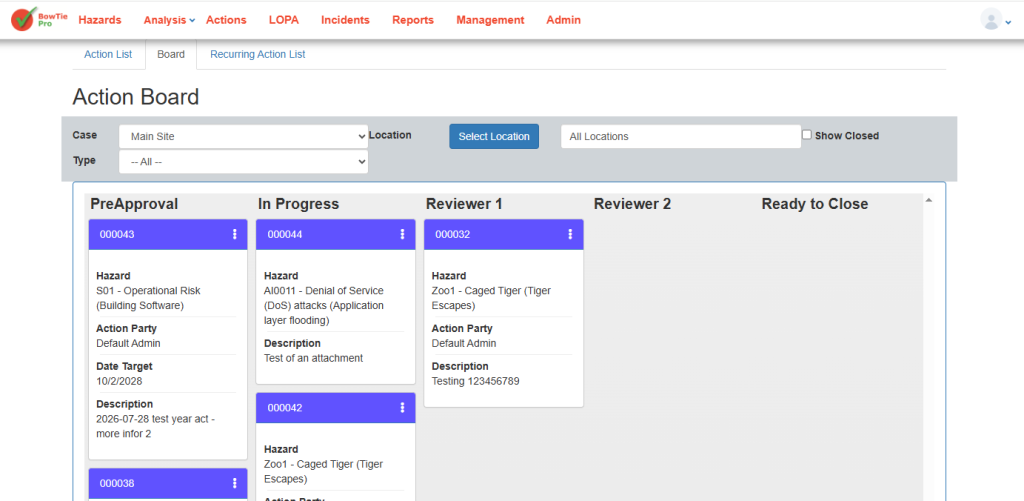
Understanding the Board Layout
The board view organises actions into separate workflow stages or categories.
Each card on the board represents an individual action.
Depending on system configuration, columns may represent:
- Open actions
- In-progress actions
- Review stages
- Completed actions
- Deficiency-related actions
This visual structure helps users quickly understand overall operational status.
Understanding Action Cards
Each action card may display:
- Action description
- Assigned user
- Priority
- Due date
- Status indicators
- Linked deficiencies
This allows users to review important action details directly from the board view.
Monitoring Workflow Progress
The board view helps users track how actions move through different workflow stages.
Users can quickly identify:
- Actions awaiting review
- Overdue tasks
- Unassigned activities
- High-priority items
- Potential bottlenecks in operational processes
Regular monitoring helps teams maintain visibility of outstanding work and identify actions that require follow-up.
Reviewing Action Details
Users can open action records directly from the board view.
Selecting an action allows users to:
- Review detailed information
- Update status
- Edit assignments
- Add notes
- Monitor completion progress
This supports centralised action management and helps ensure that relevant information is maintained within the system.
Using the Board View for Operational Reviews
The Action Board View is useful for:
- Team meetings
- Operational reviews
- Progress monitoring
- Deficiency tracking
- Corrective action follow-up
The visual layout simplifies tracking and improves communication between teams.
Benefits of the Action Board View
Using the board view helps organisations:
- Improve workflow visibility
- Monitor action progress more efficiently
- Identify overdue items quickly
- Improve accountability
- Simplify operational follow-up
- Enhance team collaboration
Best Practices
When using the Action Board View:
- Review the board regularly
- Monitor overdue actions closely
- Keep action statuses updated
- Assign ownership clearly
- Use the board during operational meetings
- Follow up on unresolved deficiencies
Maintaining accurate and up-to-date action records helps improve operational oversight, accountability and the effectiveness of action management.